
The Best Inbox Providers for Cold Email at a Glance
Our top picks are sending.ac for high volume, InboxKit for flexible Google and Microsoft inboxes, and Cheap Inboxes for simple tiered pricing.
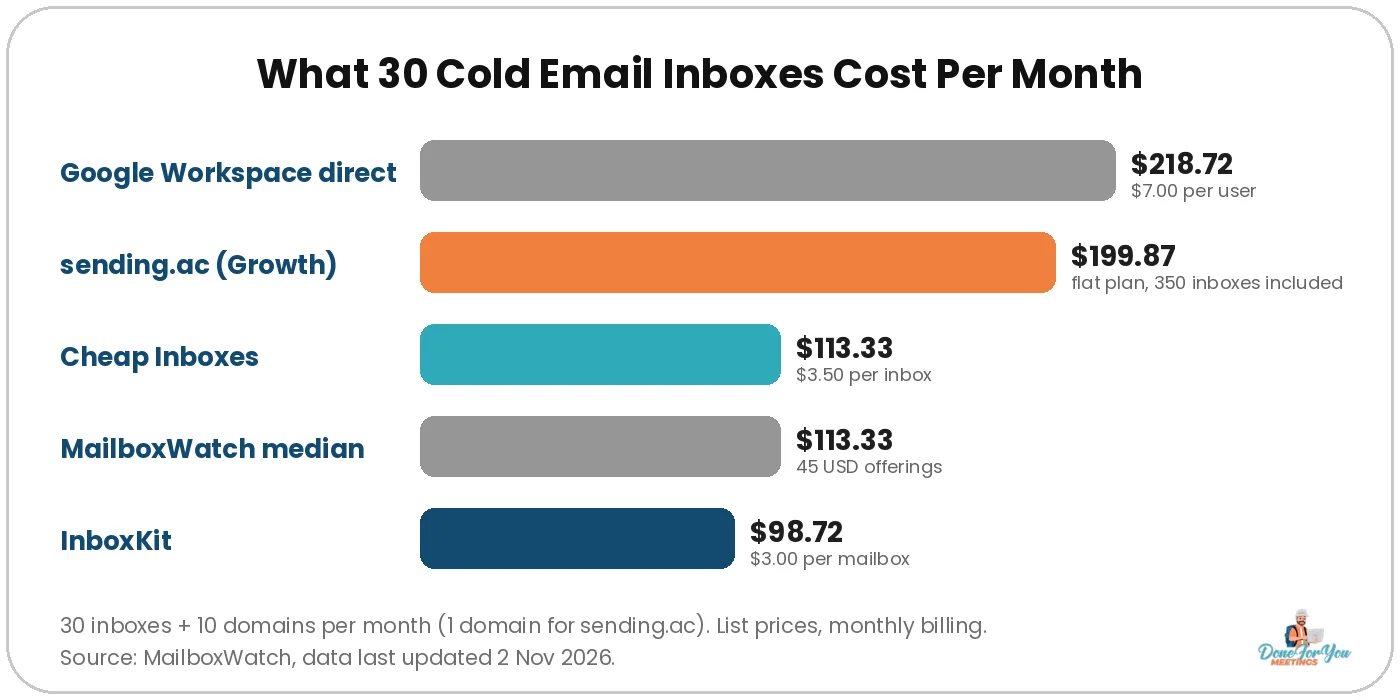
To compare them fairly, we use the same setup MailboxWatch uses: 30 inboxes plus 10 domains, priced per month. Here’s how our three picks stack up:
A quick note on what this table doesn’t show: MailboxWatch compares prices and plan terms. It doesn’t run deliverability tests, so no price table can tell you which provider will land in the inbox for your offer. That part is on your setup, your list and your copy.
sending.ac: Best for High-Volume Microsoft Sending
sending.ac sells Microsoft Azure inboxes on flat plans, so it only makes sense once you need a lot of inboxes.
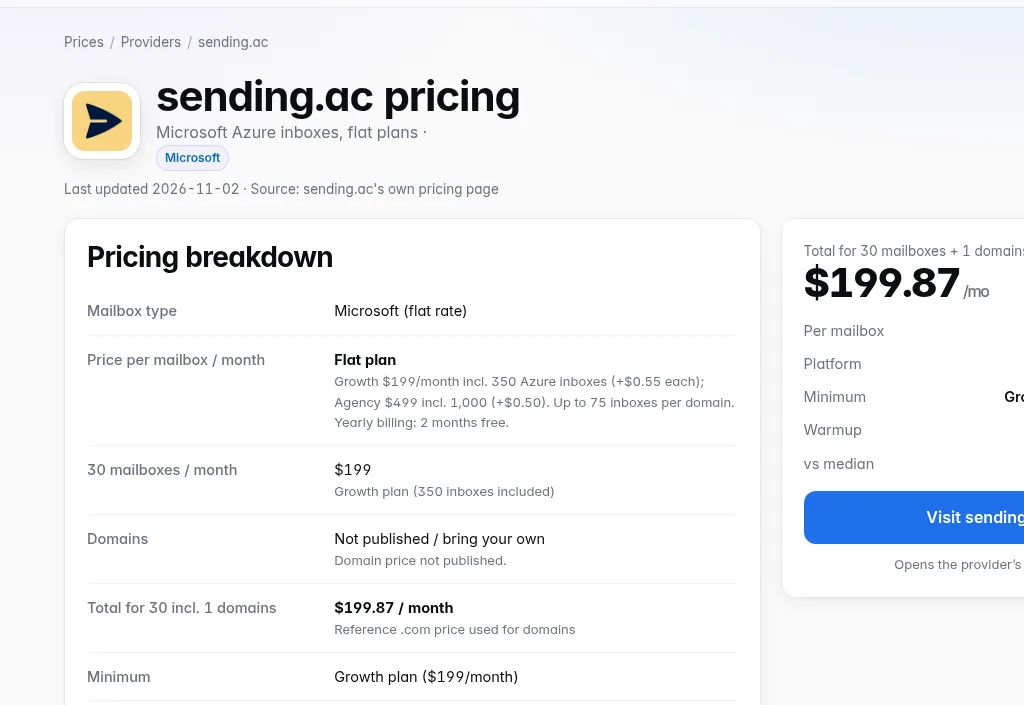
On sending.ac, you don’t pay per inbox. You pay for a plan with a big bundle of inboxes included:
- Growth: $199/month, includes 350 Azure inboxes, then $0.55 for each extra one.
- Agency: $499/month, includes 1,000 inboxes, then $0.50 each.
- Up to 75 inboxes per domain, and yearly billing gets you 2 months free.
What we like
If you fill the Growth plan, that’s 350 inboxes for $199 a month. Prewarmed infrastructure is available as an optional toggle, and MailboxWatch lists the sending cap at around 1,500 outreach emails per day on Growth.
What to watch out for
For a small setup, the maths flips. MailboxWatch prices 30 inboxes (plus 1 domain) at $199.87/month, which is $86.54 above the $113.33 median. sending.ac also doesn’t publish a domain price, so budget for domains separately. Check the sending.ac page on MailboxWatch for the full breakdown.
💡 Pro tip: A flat plan only saves you money if you use it. If you’re sending from 30 inboxes, a per-inbox provider will cost less. Once you’re into the hundreds, a flat plan like this one starts to pay off.
InboxKit: Best for Mixing Google and Microsoft
InboxKit is the cheapest of our three picks for a 30-inbox setup, and it sells both Google and Microsoft inboxes with no minimum order.
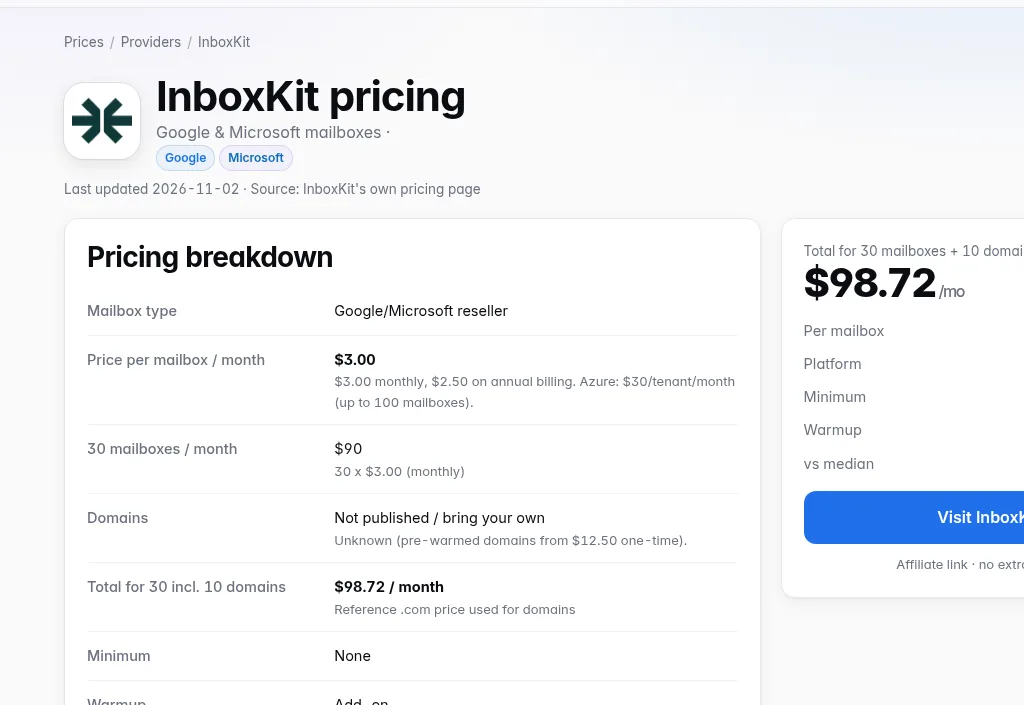
InboxKit charges $3.00 per mailbox per month on monthly billing, or $2.50 if you pay annually. MailboxWatch puts 30 mailboxes at $90/month, or $98.72 once you add 10 domains, which is below the median.
What we like
- Google and Microsoft inboxes from one place, so you can split your sending without juggling vendors.
- No minimum order.
- An Azure option at $30 per tenant per month, for up to 100 mailboxes.
- Pre-warmed domains from $12.50 (one-time).
What to watch out for
Warmup is an add-on, and MailboxWatch doesn’t show its price. InboxKit doesn’t publish a standard domain price either. See the InboxKit page on MailboxWatch for the details, or the InboxKit vs Zapmail comparison.
Cheap Inboxes: Best for Simple, Published Pricing
Cheap Inboxes charges the same price for Google and Microsoft, gets cheaper as you scale, and publishes its domain prices.
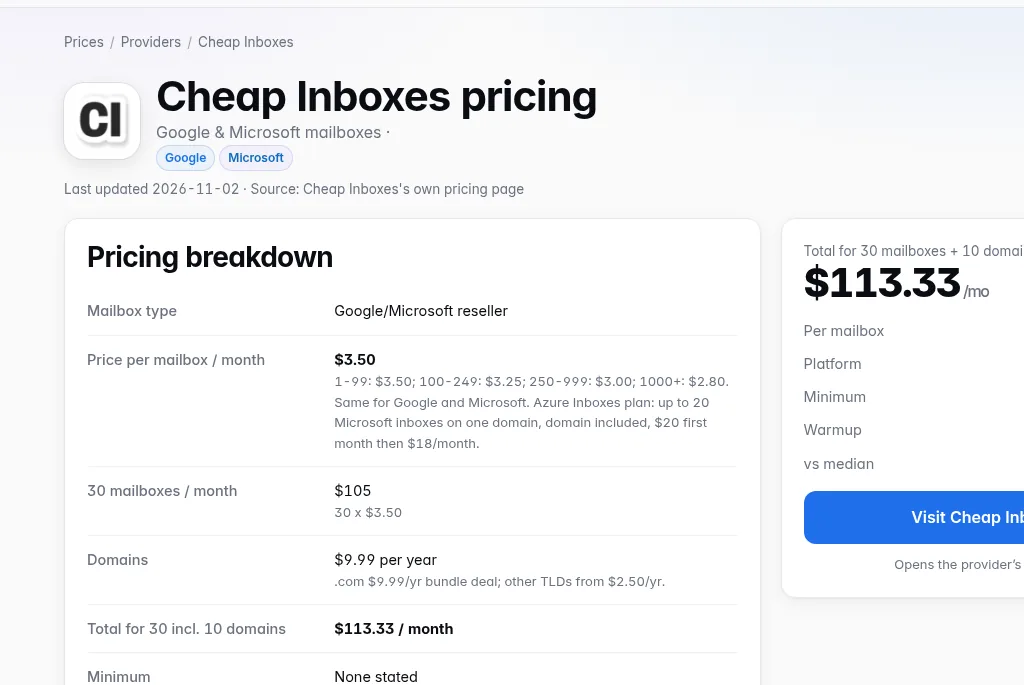
Cheap Inboxes prices by volume:
For 30 inboxes, that’s $105/month, or $113.33 with 10 domains, right on the MailboxWatch median.
What we like
- Domains are priced upfront: $9.99/year for a .com in a bundle, and other TLDs from $2.50/year. Plenty of providers don’t publish this at all.
- No minimum order stated.
- An Azure Inboxes plan: up to 20 Microsoft inboxes on one domain, domain included, for $20 the first month and $18/month after that.
What to watch out for
Warmup is unclear. MailboxWatch notes that the Cheap Inboxes FAQ mentions pre-warmed mailboxes, but a third-party source says warmup isn’t included. Plan on warming up in your sending tool. More on the Cheap Inboxes page on MailboxWatch.
Rather skip the inbox shopping?
We set up the infrastructure, write the emails and book the calls for you. We’ve worked with 500+ companies and have been doing cold email since 2014.
Other Inbox Providers Worth a Look
If none of our top 3 fit, MailboxWatch’s use-case picks are the next place to look.
MailboxWatch tracks 46 providers. Here are the ones that stand out on its best providers by use case page, plus a few names you’ll see a lot:
*Zapmail’s prices come from a third-party comparison, because its own page didn’t show full plan prices (per MailboxWatch). Totals for providers that don’t publish domain prices use MailboxWatch’s reference .com price.
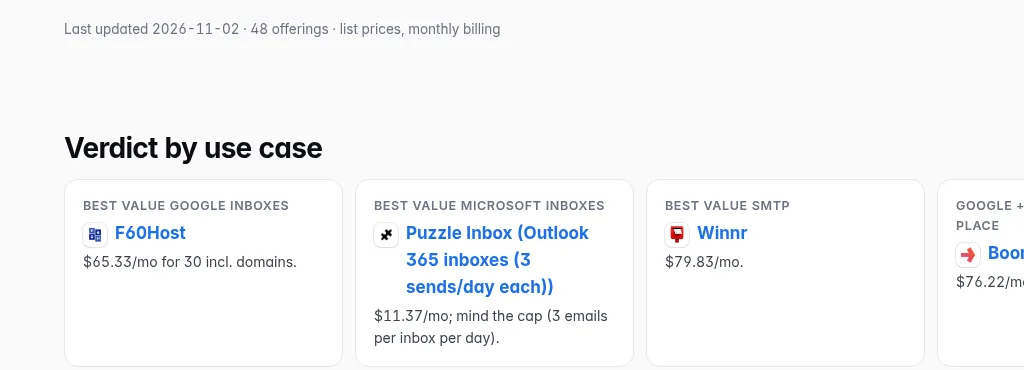
The cheap ones come with catches
The cheapest number on the board is Puzzle Inbox at $0.35 per Outlook inbox. The catch: each inbox can only send 3 emails a day, so it’s not comparable on volume. On the cheapest SMTP inboxes list, Maildoso caps each inbox at 15 sends a day. Always check the sending cap before you get excited about a price.
Already using a sending tool?
Some sending tools sell inboxes too. Instantly’s AirMail runs at $4 per inbox on Instantly’s own infrastructure (not Google or Microsoft). Smartlead’s SmartSenders sells fresh Google or Outlook inboxes at $4.50 each, but you need a paid Smartlead plan. Handy if you want one bill, but both cost more than our top picks for 30 inboxes. If you’re still picking a tool, read our Instantly review and our Smartlead guide.
How to Choose a Cold Email Inbox Provider
Pick your inbox type first, then compare the total monthly cost, setup help, warmup and sending caps.
Google vs Microsoft vs SMTP
Here’s what MailboxWatch’s guide pages show for 30 inboxes on 10 domains:
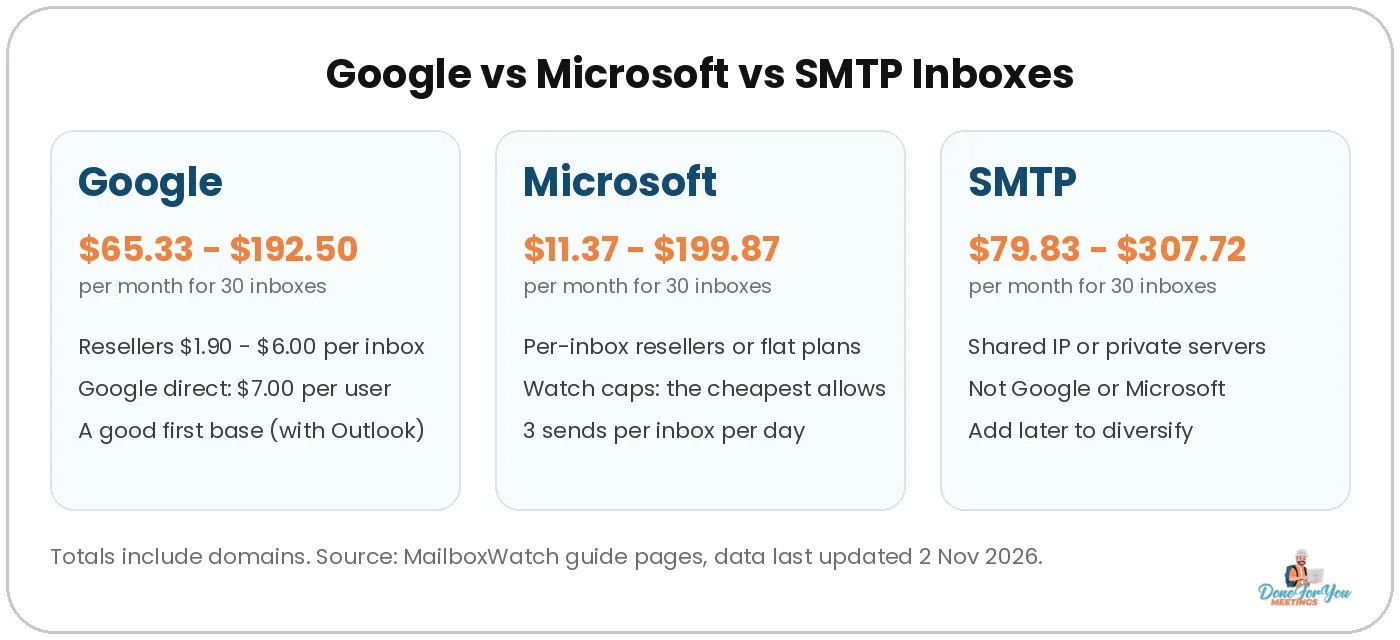
Michael’s advice in the video below: start with Google and Outlook inboxes. Once that base is working, add shared or dedicated SMTP to diversify. A dedicated IP suits offers that get strong engagement, but it punishes mistakes, because your reputation rides on your sending alone.
💡 Pro tip: Don’t put all your eggs in one basket. Spreading your sending across a couple of providers means one bad week doesn’t take down every campaign at once.
Look at the total, not the per-inbox price
A low per-inbox price can hide a plan minimum, domain costs or a sending cap. That’s why MailboxWatch compares the total for 30 inboxes plus 10 domains. Across 45 USD offerings, totals run from $11.37 to $307.72 a month, with a median of $113.33. If you want to run your own numbers, try the MailboxWatch inbox calculator or see the full infrastructure pricing breakdown.
Also worth knowing: buying through a reseller is usually much cheaper than going straight to Google. Google Workspace direct is $7.00 per user per month on an annual commitment, while resellers in MailboxWatch’s table charge $1.90 to $6.00.
Domains and DNS setup
Never send cold email from your main domain. Buy separate domains and put a few inboxes on each (MailboxWatch’s totals assume 3 per domain). Published domain prices on MailboxWatch run $9.99 to $15 a year. Many resellers handle the DNS records (SPF, DKIM and DMARC) for you, which saves a lot of fiddly setup. For naming ideas, see our guides on cold email domain names and choosing domain and email names.
Warmup
Providers handle warmup very differently: included, optional, a paid add-on, or left to you. Of our three picks, sending.ac has an optional prewarmed toggle, InboxKit sells warmup as an add-on, and Cheap Inboxes is unclear. Many sending tools include warmup anyway, and MailboxWatch also compares cold email warmup tools. Here’s how to warm up your cold emails the right way.
💡 Pro tip: Clean inboxes won’t save a dirty list. Validate your leads with a tool like MillionVerifier before you send, and read our cold email deliverability guide for the rest of the checklist.
Answers To Questions You Might Have
What is the best inbox provider for cold email?
It depends on your volume. Our top picks are sending.ac for high-volume Microsoft sending, InboxKit for flexible Google and Microsoft inboxes with no minimum, and Cheap Inboxes for simple tiered pricing with published domain prices. All pricing comes from MailboxWatch, checked on 4 Nov 2026.
How much do cold email inboxes cost?
According to MailboxWatch, 30 inboxes plus 10 domains cost between $11.37 and $307.72 a month across 45 USD offerings, with a median of $113.33. Per-inbox prices run from $0.35 to $6.00, but the cheapest options often come with low sending caps.
Should I use Google, Outlook or SMTP inboxes for cold email?
Our CEO’s advice is to start with Google and Outlook inboxes, then add shared or dedicated SMTP once your base is working, to diversify. Dedicated IPs suit high-engagement offers but punish mistakes.
Is it cheaper to buy Google Workspace from a reseller?
Usually, yes. MailboxWatch lists Google Workspace direct at $7.00 per user per month on an annual commitment, while the Google resellers in its table charge $1.90 to $6.00 per inbox.
Do cold email inbox providers include warmup?
Some do and some don’t. MailboxWatch lists warmup as included, optional, an add-on or not included, depending on the provider. Many sending tools include warmup too, so check before you pay for it twice.
Wrapping Up
Buying cold email inboxes doesn’t have to mean fifteen tabs and a headache. If you’re sending at serious volume, look at sending.ac. If you want Google and Microsoft from one place with no minimum, go with InboxKit. If you want simple pricing and cheap domains, Cheap Inboxes is a solid pick.
Whatever you choose, compare the total monthly cost, check the sending caps, warm up properly and keep an eye on MailboxWatch, because these prices change.
Hungry for more tips on conquering the B2B world? Keep your eyes glued to our CEO’s YouTube channel!
Want us to handle your outreach from inboxes to booked calls? We’ve sent 5,000,000+ cold emails and booked 5,000+ calls for 500+ companies since 2014.
P.S. If you’re interested in growing your business with outreach, you can join multiple agency owners, coaches, and freelancers in our outreach community to get expert tips, templates, and much more!
Cheers to full inboxes and fuller calendars! 🥂

Author:
Michael Gardiner
Michael is a cold email expert who has been doing cold email since 2014. He has worked with 500+ B2B companies ranging from startups to Fortune 500s, sent over 5,000,000 emails, generated 50,000+ replies and booked 5,000+ calls, driving multi-7-figure revenue from email. Outside of work, you will find him traveling around the world with a goal to set foot in every country.