
How Our Cold Email Stack Fits Together
Four jobs, in order: find the leads, enrich them, set up inboxes, then send.
Most messy setups have the order wrong. People buy a sending tool first, then hunt for leads to feed it, then wonder why half the emails bounce. Here’s how the pieces connect:
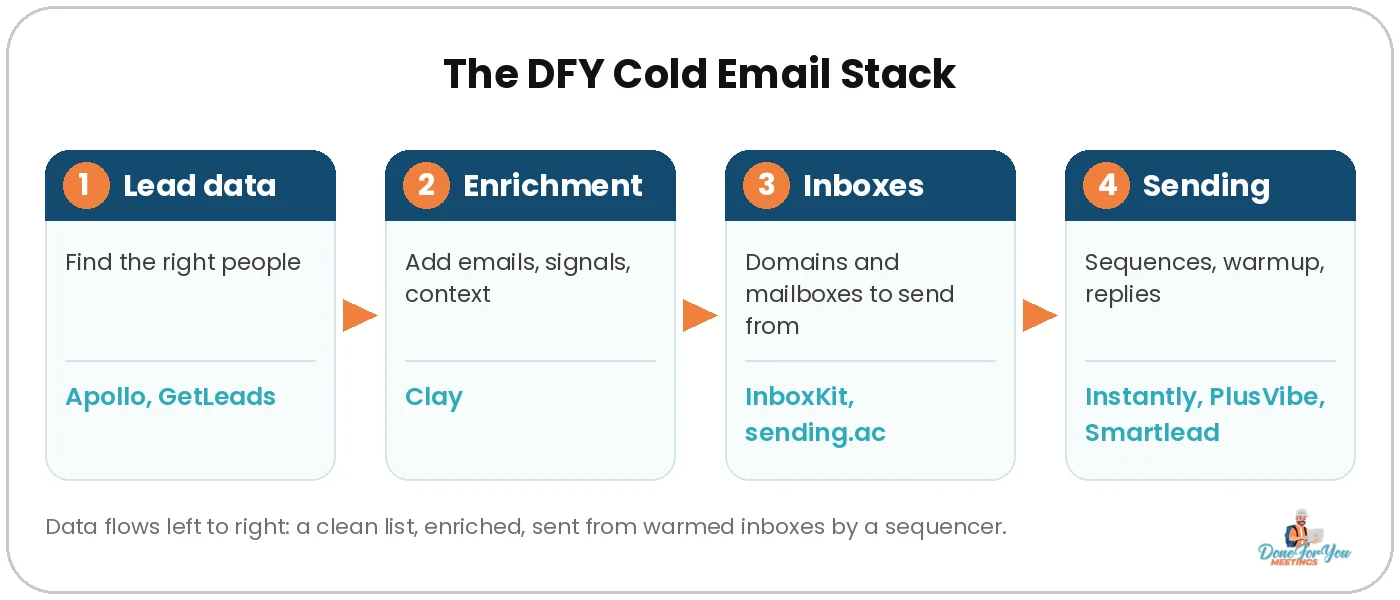
- Lead data: build a list of the right companies and people.
- Enrichment: add verified emails, signals and the context that makes a first line feel personal.
- Inboxes: separate domains and mailboxes, so your main domain never takes the hit.
- Sending: a sequencer that spreads volume across inboxes, warms them up and collects replies.
You don’t need every tool on this list. Most teams need one from each row.
💡 Pro tip: Never send cold email from your main domain. Our guide to cold email domain names covers how many domains and inboxes to buy.
Lead Data: Apollo and GetLeads
Apollo is the all-rounder with a free plan; GetLeads is the flat-price option for teams that pull big lists through AI.
Apollo
Apollo is a B2B database with sequences, a dialer and deal management built in. Its pricing page says you can access 240M contacts and 30M companies.
- Best for: teams that want data and a basic outreach platform in one place, or want to start free.
- Key features: waterfall enrichment, unlimited sequences and a deliverability suite with email warmup, all from the Basic plan up.
- Starting price: Free plan with 900 credits per seat per year. Basic is $49 per seat a month billed annually, or $65 billed monthly (checked 4 Nov 2026).
The Free and Basic plans allow 1 mailbox per user and 250 sends a day, so it works best for finding leads, with the heavy sending done in a dedicated tool.
GetLeads
GetLeads gives you unlimited access to B2B contact data for a flat monthly price. You use it through its API, webhooks or by connecting it to AI tools like Claude and ChatGPT. Full disclosure: its founder is a personal friend of Michael’s.
- Best for: agencies and GTM engineers who pull large lists and don’t want to count credits.
- Key features: access to 542M+ contacts, 125M work emails and 88M cellphones, with data refreshed monthly.
- Starting price: Free with 1,000 credits. Paid plans are $249/month (Partner, which asks you to post about GetLeads on LinkedIn twice a month) or $497/month (Unlimited, no posting needed) (checked 4 Nov 2026).
Want the full rundown? Read our GetLeads review.
Enrichment: Clay
Clay turns a basic list into a personalised one by pulling from many data providers in one table.
Clay
Clay is a spreadsheet-style tool that pulls data from 150+ providers, runs waterfalls to find emails and phone numbers, and uses AI research (Claygent) to write the context you’d normally dig up by hand.
- Best for: anyone who wants personalisation at scale, or to fill email gaps that one database misses.
- Key features: waterfall enrichment across providers, Claygent AI research, and job-change signals on paid plans.
- Starting price: Free plan with 500 actions and 100 data credits a month. Launch starts at $185/month billed monthly, or $167/month billed annually (checked 4 Nov 2026).
New to Clay? Our guide on how to use Clay to automate your lead generation walks you through it.
💡 Pro tip: However you build the list, validate every email before it goes into a campaign. Bounces hurt your sender reputation fast.
Inboxes: InboxKit and sending.ac
InboxKit is pay-per-mailbox with no minimum; sending.ac is a flat plan with a lot of Azure inboxes included.
InboxKit
InboxKit sells Google Workspace and Microsoft 365 mailboxes at one flat rate, with automated DNS setup and admin panel access.
- Best for: small to mid setups that want Google and Microsoft inboxes and the freedom to start small.
- Key features: same price for Google and Microsoft with no minimum, plus 24+ sequencer integrations. Pre-warmed mailboxes are available if you can’t wait for warmup.
- Starting price: $3.00 per mailbox a month, or $2.50 billed annually. Warmup is a paid add-on (checked 4 Nov 2026).
sending.ac
sending.ac provisions Microsoft Azure mailboxes in bulk and checks your inbox placement daily. It sits underneath your sending tool and works with Smartlead, Instantly and PlusVibe.
- Best for: high-volume senders who need hundreds of inboxes on few domains.
- Key features: up to 75 inboxes on one domain, prewarmed inboxes, plus an API and MCP server for provisioning.
- Starting price: Growth is $199/month billed monthly with 350 Azure inboxes included, then $0.55 per extra inbox. Yearly billing gives you 2 months free (checked 4 Nov 2026).
Right now every plan runs on Azure. Google mailboxes are on a waitlist. For a deeper comparison, see our guide to the best inbox providers for cold email.
💡 Pro tip: New inboxes need a few weeks of warmup before they send real campaigns. Here’s how to warm up cold emails the right way.
Rather not stitch 8 tools together?
We run the whole stack for you: data, inboxes, copy and sending, right through to booked calls. We’ve worked with 500+ companies and booked 5,000+ calls.
Sending: Instantly, PlusVibe and Smartlead
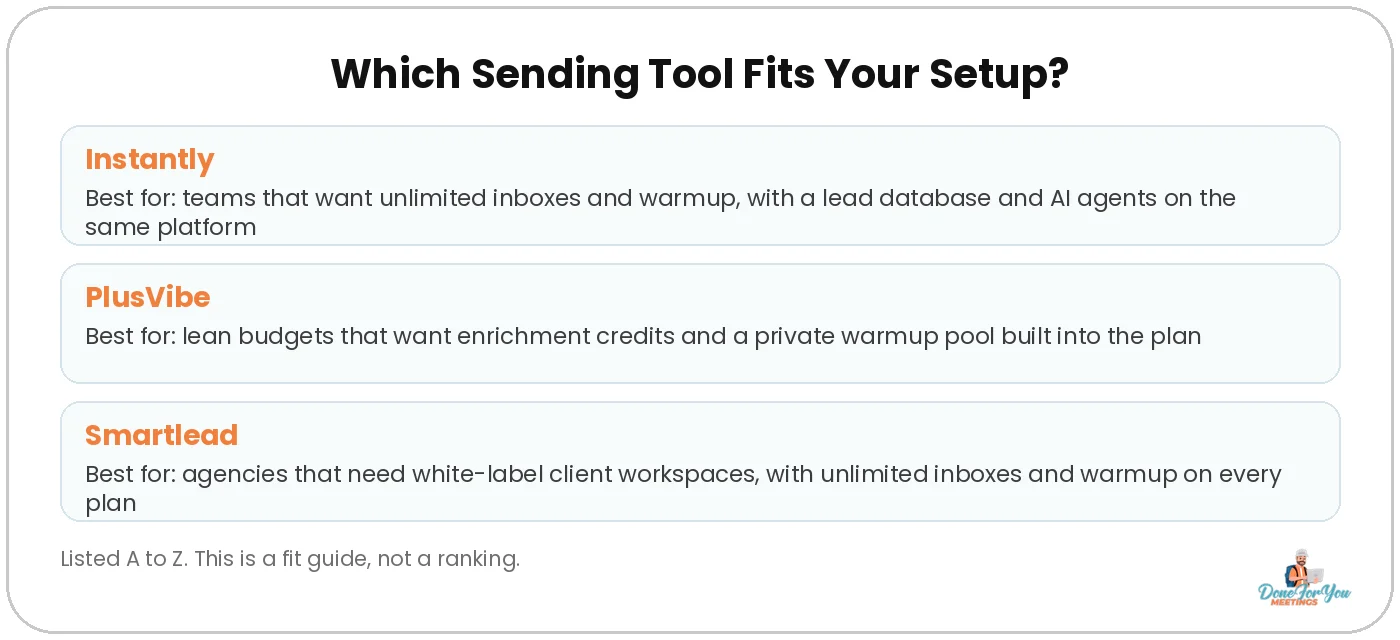
All three run solid campaigns. They’re listed A to Z, so pick the one that fits how you send.
Want the full side-by-side? Read our breakdown of the best cold email sending tools.
Instantly
Instantly includes unlimited email accounts and warmup on every outreach plan. Lead data and AI agents run on a separate Credits subscription.
- Best for: teams that want a lead database (450M+ contacts) and AI agents on the same platform as their sending.
- Key features: unlimited accounts and warmup, A/Z testing and API access from the Growth plan.
- Starting price: Growth is $47/month for 5,000 emails and 1,000 contacts. Replying from the Unibox needs Hypergrowth ($107/month). 14-day free trial, no card (checked 4 Nov 2026).
Michael walks through the whole setup in this tutorial:
There’s more in our Instantly review.
PlusVibe
PlusVibe bundles sending, warmup, a unified inbox and enrichment credits in one plan.
- Best for: lean budgets that want enrichment and warmup built in from day one.
- Key features: a private warmup pool of 350k+ inboxes, plus AI reply agents and webhooks on the Business plan.
- Starting price: Personal from $37/month with 25,000 emails, 30,000 active leads and 1,000 enrichment credits. 14-day free trial (checked 4 Nov 2026).
Smartlead
Smartlead gives you unlimited email accounts and warmup on every plan, with automatic mailbox rotation and one master inbox for replies.
- Best for: agencies running campaigns for several clients.
- Key features: unlimited accounts and warmup on every plan, and white-label client workspaces from the Pro plan.
- Starting price: Base is $39/month with 6,000 sends and 2,000 contacts. Pro ($94/month) adds the CRM, API and webhooks. 14-day free trial, no card (checked 4 Nov 2026).
Michael’s Smartlead tutorial and our Smartlead guide cover setup step by step.
All 8 Tools at a Glance
One tool per job is enough to start. Pick the row you’re missing.
How To Pick Your Stack
- Starting from zero on a budget? Apollo’s free plan for data, InboxKit for a handful of inboxes, and any of the three sending tools on a free trial.
- Personalising at scale? Add Clay between your data and your sending tool.
- Sending serious volume? Look at GetLeads’ flat price for data and sending.ac’s flat plan for inboxes.
- Running clients? Check client workspaces and white-labelling before you pick a sending tool.
💡 Pro tip: Add up the full monthly cost (data + inboxes + domains + sending) before you compare. A pricier tool can work out cheaper once inboxes or lead credits are included. Our cold email deliverability guide covers the setup side.
Answers To Questions You Might Have
What tools do I need to start cold email?
At minimum, you need a lead source, separate domains and inboxes, and a sending tool. Enrichment with a tool like Clay is optional at first, but it’s how you personalise at scale.
Which sending tool is the best?
There isn’t one best tool for everyone, so we list Instantly, PlusVibe and Smartlead A to Z. Instantly fits teams that want lead data on the same platform, PlusVibe fits lean budgets and Smartlead fits agencies with clients.
Is Apollo enough on its own?
Apollo has data, sequences and a dialer, so you can start there. Its Free and Basic plans allow 1 mailbox per user and 250 sends a day, though, so most teams add dedicated inboxes and a sending tool once they scale.
Do I need Google or Microsoft inboxes?
Many senders use a mix. InboxKit offers both Google and Microsoft at the same price. sending.ac runs on Microsoft Azure today, with Google on a waitlist.
Are these affiliate links?
Yes. Every tool link in this post is an affiliate link, so we may earn a commission at no cost to you. We only list tools we recommend.
Wrapping Up
The best cold email stack isn’t the biggest one. It’s one tool per job, set up in the right order: data, enrichment, inboxes, sending. Get those four right and your time goes into writing better emails, not managing software.
Hungry for more tips on conquering the B2B world? Keep your eyes glued to our CEO’s YouTube channel!
Want us to run your cold email from list to booked calls? We’ve sent 5,000,000+ cold emails, got 50,000+ replies and booked 5,000+ calls since 2014.
P.S. Want to swap notes with other people doing outbound? Join our community.
Cheers to filling your calendar!

Author:
Michael Gardiner
Michael is a cold email expert who has been doing cold email since 2014. He has worked with 500+ B2B companies ranging from startups to Fortune 500s, sent over 5,000,000 emails, generated 50,000+ replies and booked 5,000+ calls, driving multi-7-figure revenue from email. Outside of work, you will find him traveling around the world with a goal to set foot in every country.