
Cold Email Domain and Inbox Calculator
Enter how many cold emails you want to send and see how many inboxes and domains you need. Assumes 2 inboxes per domain and sending Monday to Friday only.
How many cold emails do you want to send?| Option | Per inbox / day | Inboxes | Domains |
|---|
Assumes 21.7 sending days a month (Monday to Friday) and 2 inboxes per domain. Inboxes and domains are rounded up. These are cold emails only; warmup runs on top. Warm up new inboxes before you send.
Want us to set up your domains and inboxes for you? Book a call
How Many Domains Do You Need for Cold Email? The Formula
Divide your daily target by how many emails each inbox sends, round up, then divide by two for domains.
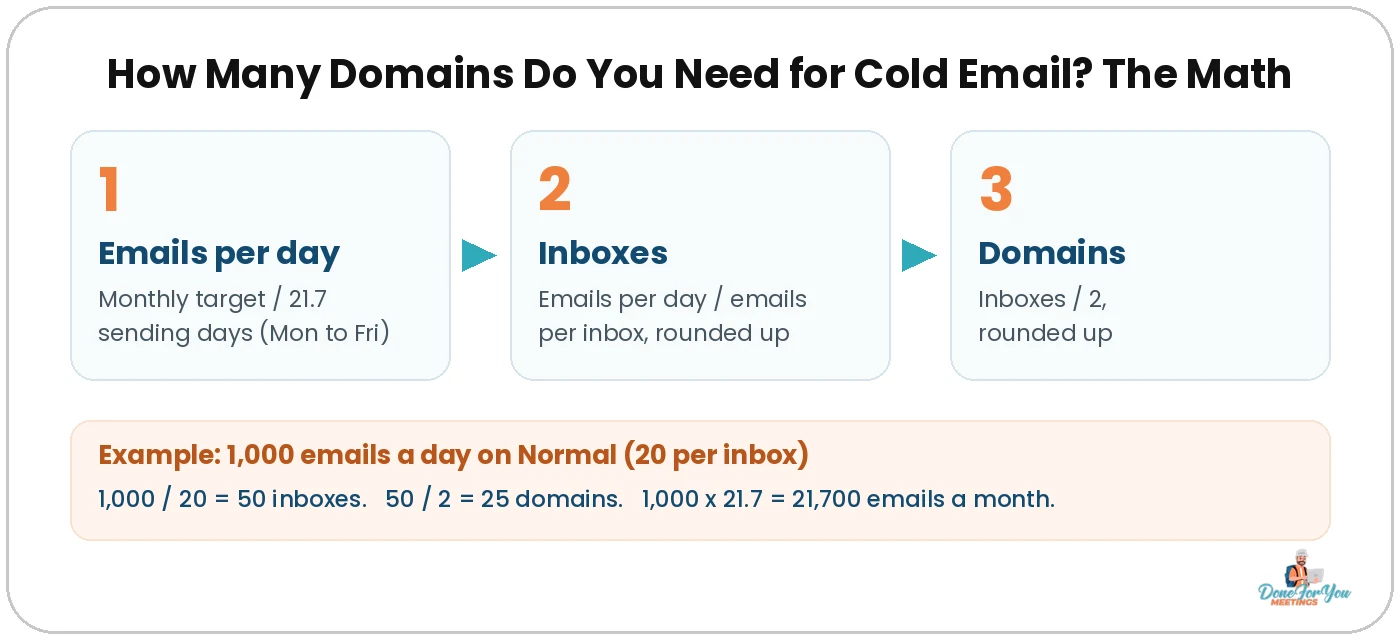
That’s the whole thing. Here it is step by step:
- Work out your daily target. If you think in months, divide by 21.7. That’s the average number of weekdays in a month, because we only send Monday to Friday (your prospects aren’t reading cold emails on a Sunday, and neither should your inboxes be sending them).
- Inboxes needed = emails per day ÷ emails per inbox per day, rounded up. You can’t buy 49.3 inboxes.
- Domains needed = inboxes ÷ 2, rounded up. We put 2 inboxes on each domain.
Why only two inboxes per domain? Because spreading the load keeps each domain’s reputation healthy. If one domain gets into trouble, you lose two inboxes, not ten. On a standard Google or Outlook setup, Michael runs 2 to 3 emails per domain, and our calculator uses 2 to keep things on the safe side.
💡 Pro tip: Never send cold email from your main company domain. Buy separate domains that look like your brand (more on naming in our cold email domain names guide), so your main domain stays clean for your team, your clients and your invoices.
The 4 Sending Speeds: Conservative to Super Aggressive
Pick how many cold emails each inbox sends per day: 15, 20, 25 or 30, Monday to Friday.
This is the biggest dial in the whole calculation. The fewer emails each inbox sends, the more inboxes you need, but the gentler you are on your deliverability.
These numbers are cold emails only. If you also run warmup on those inboxes, that sits on top. We cover how to balance the two in our guide on how to warm up cold emails.
Not sure which one to pick? Start on Normal. Move down to Conservative if your domains are new, your list is untested, or replies are dropping off. Only push to Aggressive or Super aggressive once your setup has a track record of landing in the inbox.
Worked Example: 1,000 Cold Emails a Day
At 1,000 emails a day on the Normal setting, you need 50 inboxes across 25 domains.
Let’s run the math the long way so you can see exactly what the calculator does:
- Daily target: 1,000 emails a day, Monday to Friday. That’s 1,000 × 21.7 = 21,700 emails a month.
- Emails per inbox: Normal = 20 a day.
- Inboxes: 1,000 ÷ 20 = 50 inboxes.
- Domains: 50 ÷ 2 = 25 domains.
Thinking in months instead? Say you want 10,000 emails a month. That’s 10,000 ÷ 21.7 ≈ 461 a day. Then 461 ÷ 20 = 23.04, which rounds up to 24 inboxes, and 24 ÷ 2 = 12 domains. Rounding up matters: 23 inboxes would leave you a few emails short every single day.
Here’s the same math across all four sending speeds at a few common volumes:
💡 Pro tip: Plug in the volume you want to hit in three months, not today. Inboxes need time to warm up before they send campaigns, so if you buy only what you need right now, you’ll be stuck waiting when you want to scale.
What Changes the Numbers: Industry and Inbox Provider
Tough industries lower what each inbox can safely send, and inboxes bought directly from Google or Outlook can send a bit more.
Two checkboxes in the calculator handle this. Here’s what they do.
1. Hard-to-deliver industries (like insurance and finance)
Some industries just land in spam more often. If you’re emailing about insurance, finance or anything in that neighbourhood, inbox providers tend to be stricter, and the safe volume per inbox drops.
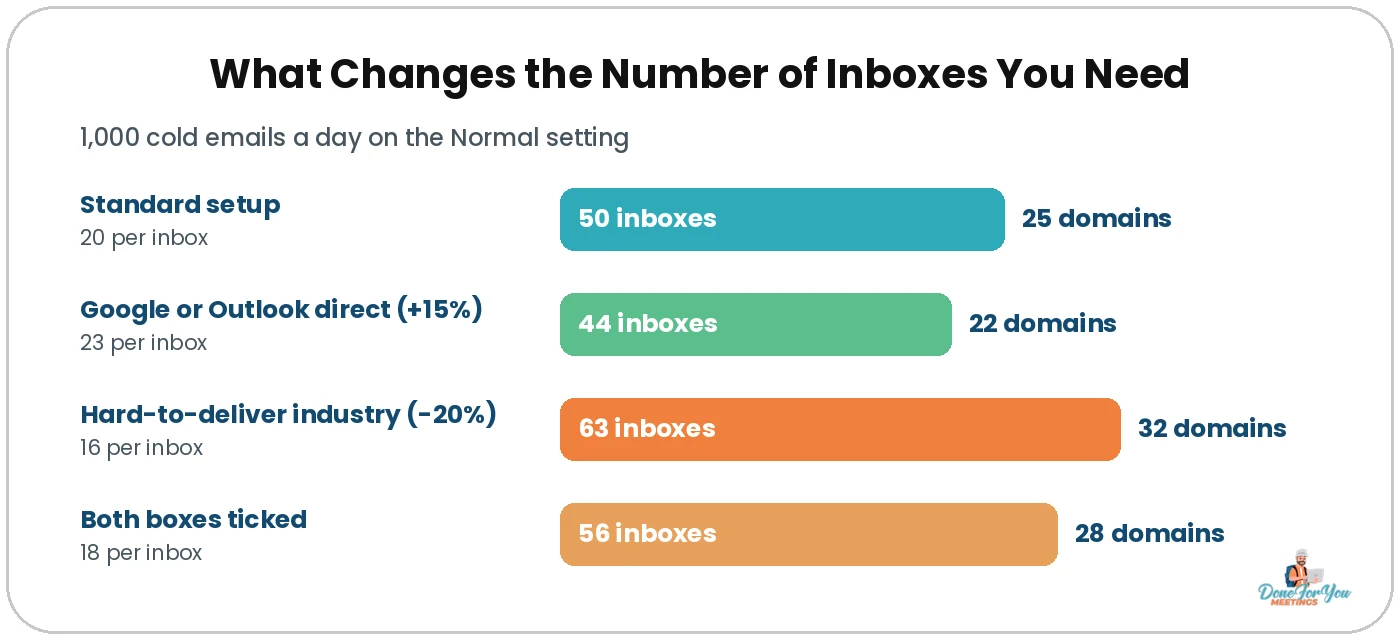
When you tick this box, the calculator sends 20% fewer emails per inbox. On Normal, that takes you from 20 to 16 a day. For 1,000 emails a day, you’d need 63 inboxes and 32 domains instead of 50 and 25.
2. Inboxes directly from Google or Outlook (Microsoft)
If you buy your inboxes straight from Google Workspace or Microsoft 365 (what Michael calls a “vanilla” setup), rather than through a reseller or bulk inbox provider, we give each inbox 15% more sending capacity. On Normal, that’s 23 a day instead of 20.
For 1,000 emails a day, that’s 44 inboxes and 22 domains instead of 50 and 25.
Tick both boxes and the two adjustments stack: 20 × 0.8 × 1.15 = 18.4, which the calculator rounds down to 18 per inbox (it never rounds up how much an inbox sends, only how many inboxes you need). That gives you 56 inboxes and 28 domains.
Want us to set this up for you?
We buy and set up the domains and inboxes, warm them up and run the campaigns for you. We’ve worked with 500+ companies doing cold email since 2014.
How To Set Up Your Domains and Inboxes the Right Way
Buy clean domains, put 2 inboxes on each, warm them up, and spread your volume evenly across all of them.
Knowing the number is half the job. Here’s how we set them up.
👇 Michael walks through naming your domains and inboxes (and how many emails to put on each domain) in this video:
Step 1: Buy clean, believable domains
Stick to .com, .us or your country’s ending. Skip numbers, dashes and buzzwords. Our domain names guide has a free generator that spits out dozens of variations of your brand in seconds, and our older post on choosing domain and email names covers the basics.
Step 2: Name your inboxes after a real person
Use your own name and variations of it (michael@, michaelg@, michael.gardiner@), with a real headshot on every inbox. Two inboxes per domain means you only need a handful of name variations.
Step 3: Warm them up before you send
New inboxes shouldn’t go from zero to full speed on day one. Run warmup for a few weeks first. A common rule of thumb is at least two weeks before the first campaign, and longer is safer. Keep warmup running alongside your campaigns afterwards.
Step 4: Spread the volume across every inbox
Load all your inboxes into a sending tool like Smartlead or Instantly and set the daily limit per inbox to the number from the calculator. The tool rotates sends across all of them, so no single inbox does the heavy lifting. Our Smartlead guide and Instantly review show you where those settings live.
💡 Pro tip: Buy a few spare domains and inboxes beyond what the calculator says. If one domain starts struggling, you can rest it and swap in a warmed-up spare without your daily volume dropping. Our cold email deliverability guide covers how to spot a struggling domain.
Common Mistakes When Sizing Your Setup
Most problems come from squeezing too much volume out of too few inboxes.
1. Picking the sending speed you want, not the one your setup can handle
Super aggressive looks great on a spreadsheet. If your domains are brand new, it’s a gamble. Start lower and earn the right to scale.
2. Counting weekends
A 30-day month isn’t 30 sending days. If you divide your monthly target by 30, you’ll end up short on inboxes. Use 21.7.
3. Rounding down
49.3 inboxes means 50 inboxes. Round down and every inbox has to send a little over its limit, every day.
4. Forgetting the list
More inboxes won’t fix a bad list. Bounces hurt every domain you own, so validate your emails before you hit send.
Answers To Questions You Might Have
How many cold emails can one inbox send per day?
In our calculator, each inbox sends 15 (Conservative), 20 (Normal), 25 (Aggressive) or 30 (Super aggressive) cold emails a day, Monday to Friday. We’d start most setups on Normal. Those numbers are campaign emails only, with warmup running on top.
How many inboxes should I put on each domain?
Our calculator uses 2 inboxes per domain. On a standard setup with inboxes straight from Google or Outlook, Michael runs 2 to 3 per domain. If you buy through a reseller or infrastructure provider, ask them what they recommend for their platform.
How many domains do I need to send 1,000 cold emails a day?
On the Normal setting (20 emails per inbox per day), you need 50 inboxes across 25 domains. On Conservative it’s 67 inboxes and 34 domains, and on Super aggressive it’s 34 inboxes and 17 domains.
Why does the calculator assume Monday to Friday only?
Because that’s when your prospects are at work and reading email. The calculator uses about 21.7 sending days a month (the average number of weekdays), so a monthly target is divided by 21.7 to get your daily target.
Do I need to warm up new inboxes first?
Yes. Don’t send campaigns from brand new inboxes. Warm them up for a few weeks first (a common rule of thumb is at least two weeks), and keep warmup running alongside your campaigns.
Wrapping Up
Working out how many domains you need for cold email isn’t guesswork. Take your daily target, divide by emails per inbox, round up, then halve it for domains. Adjust for a tough industry or a direct Google or Outlook setup, and you’re done. Or just let the calculator at the top of this post do it for you.
Hungry for more tips on conquering the B2B world? Keep your eyes glued to our CEO’s YouTube channel!
Rather skip the spreadsheets? We’ll size, build and run your whole cold email setup. We’ve sent over 5,000,000 cold emails and booked 5,000+ calls for 500+ companies since 2014.
Cheers to full calendars and healthy inboxes! 🥂

Author:
Michael Gardiner
Michael is a cold email expert who has been doing cold email since 2014. He has worked with 500+ B2B companies ranging from startups to Fortune 500s, sent over 5,000,000 emails, generated 50,000+ replies and booked 5,000+ calls, driving multi-7-figure revenue from email. Outside of work, you will find him traveling around the world with a goal to set foot in every country.